Appointment businesses
Let bookings come in while you look after your customers
A customer who cannot reach you by phone writes to another business. HeppChat answers instantly: it shows open slots, books the chosen one into the calendar and sends a reminder when the day comes. Your calendar stays full while you work.
Sound familiar?
The phone rings while your hands are full
When you are with a customer, calls and messages are hard to catch. Every unanswered request is an appointment that goes to another business.
A paper book, a phone and memory — three calendars
When who is coming, which staff member is available and days off are kept in different places, double bookings become inevitable.
No-shows leave chairs empty
Appointments nobody was reminded of get forgotten; every empty hour is capacity that earns nothing.
How it works
The screens below are from the real panel. How the bot takes a booking and how the team sees its day — this is the flow.
After closing time
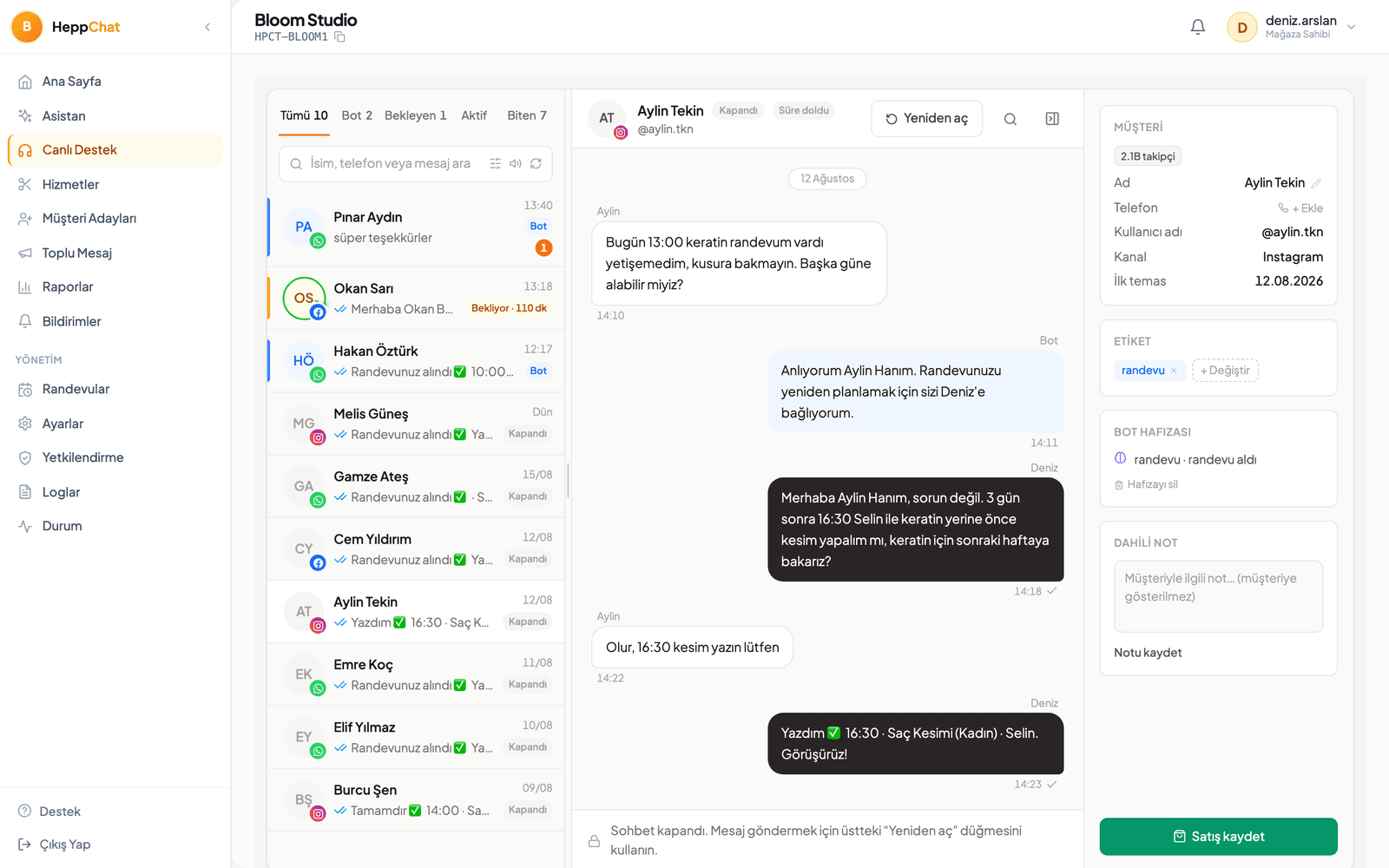
The bot shows open slots and books the appointment
A customer writes at night: 'do you have anything tomorrow morning?' The bot checks staff schedules and existing bookings, offers the open slots; the customer picks one, the appointment lands on the calendar and a confirmation goes out. The message can come from WhatsApp, Instagram or Messenger — all in one inbox.
- Open slots are computed from real staff schedules
- Conflicting bookings for the same staff member are structurally impossible
- Service duration and price come from the list you define
In the morning
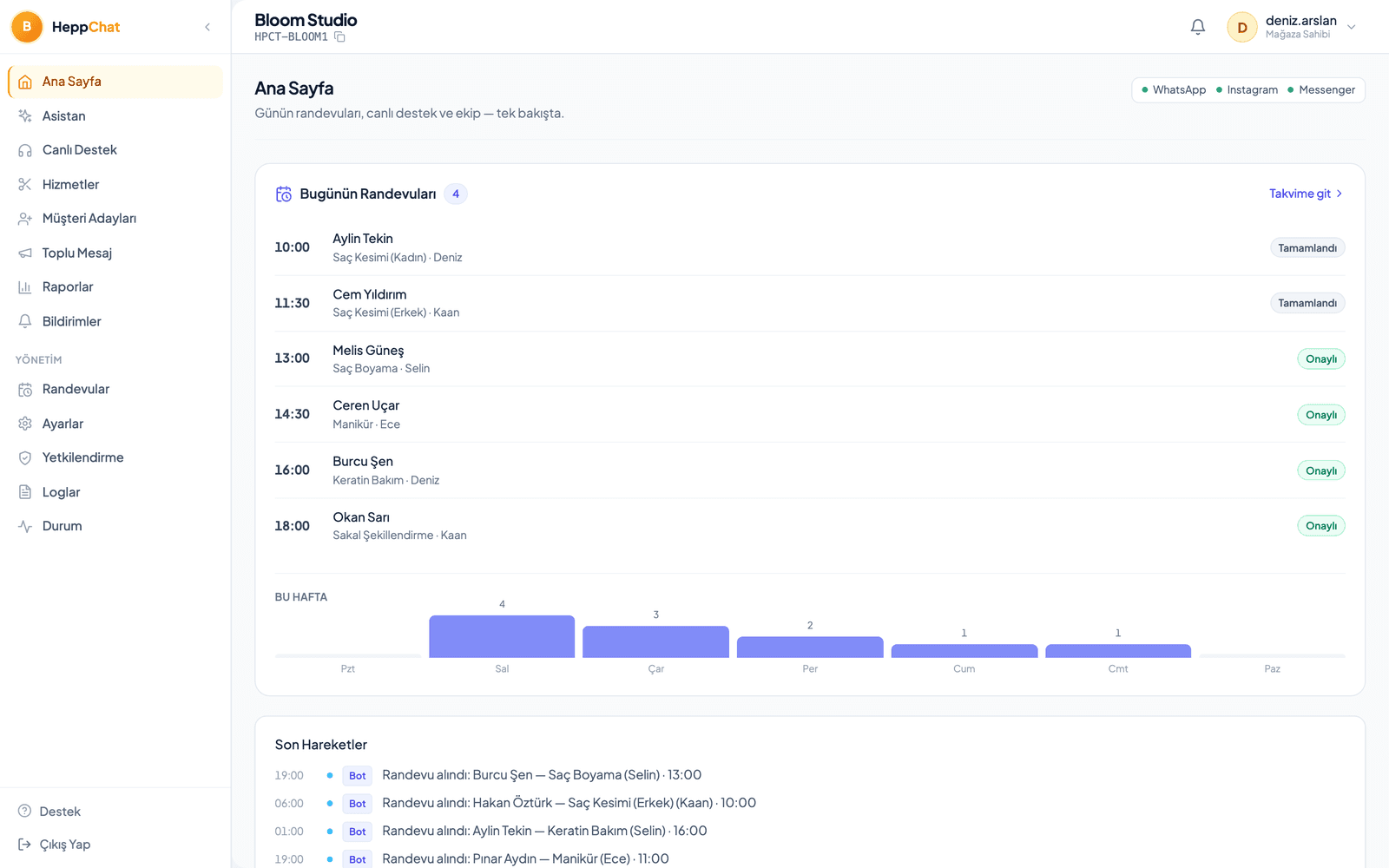
The day's schedule at a glance
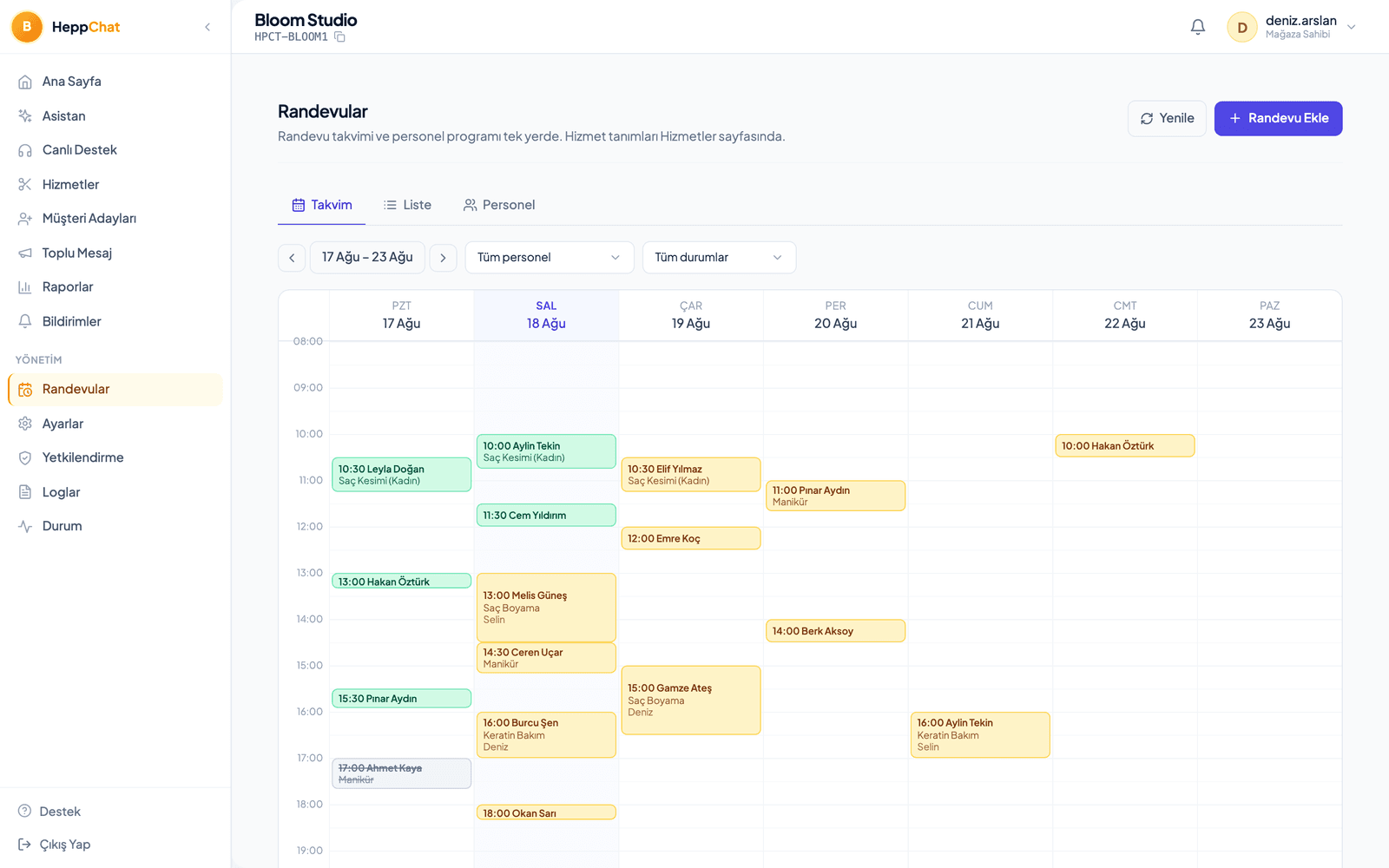
The panel home page lists today's appointments; the calendar view shows the week per staff member. Walk-ins and phone bookings go into the same calendar from the panel — one source, no clashes.
- Calendar, list and staff views on one page
- Walk-in and phone bookings added from the panel
- Cancellations and no-shows are tracked in reports
As the appointment approaches
The reminder goes out; changes are handled in chat
The bot reminds the customer. If they ask to move the time and a slot is open, it rebooks; if the schedule is full, it hands the conversation to your team — the customer is never left unanswered.
- Reminders are sent automatically
- Rescheduling and cancellation happen in the same chat
- When the bot can't resolve it, your team takes over with full context
For every business that runs on appointments
The core is the same: a service list + staff schedules + a calendar. The only thing that changes by industry is what your services are called.
- Hair & beauty salons
- Clinics & practices
- Dentists
- Auto service & detailing
- Courses & tutoring
- Pet grooming & vets
- Real estate (viewings)
- Consulting
What does it take to set up the appointment system?
Three things you do not need: a website, technical skills, a flowchart.
HeppChat's appointment system works without a website.
You do not need a website, a booking page or a separate app. Your customer writes on WhatsApp, Instagram DM or Facebook Messenger; HeppChat shows open slots and books the appointment into the calendar. Entering your services and staff schedule in the panel is enough.
Setup is simple, and setup support is there when you get stuck.
You enter your service list, durations, prices and staff working hours in the panel; your WhatsApp number is connected through the official WhatsApp Business Platform. No technical skills needed. We provide setup support at every step you get stuck on, and if you like, we test the first bookings together.
You never build a flowchart or a rule tree.
HeppChat is not a classic chatbot: no "press 1, press 2" menu and no condition tree. You describe your business in a few sentences, the AI assistant learns your services, prices and rules, and offers the right slot however the customer asks.
Frequently asked
- Can the bot book a wrong slot?
- No. Open slots are computed from staff working hours and existing bookings; a conflicting booking for the same staff member is blocked by the system. If a staff member is off, that day's slots are never offered.
- What about bookings taken by phone or at the door?
- You add them from the panel in seconds, and the bot treats those slots as taken in its next suggestions. One calendar means no book-versus-phone clashes.
- What if the customer doesn't show up?
- You mark the appointment as a no-show; cancellation and no-show rates appear in your reports.
- Which channels does it work on?
- WhatsApp, Instagram DM and Facebook Messenger. All three land in the same inbox and the same calendar.
- Every service takes a different amount of time — does the bot know?
- Yes. In the service list you define each service's duration, price and any buffer to leave afterwards; the bot offers slots accordingly.
- How do I set up a WhatsApp appointment system?
- You connect your number to HeppChat through the official WhatsApp Business Platform; the number keeps working on your phone. Enter your services, staff and working hours in the panel; the AI assistant offers open slots from that calendar. Setup support is there wherever you get stuck, and if you like we test the first bookings together.
- Which businesses is the WhatsApp booking bot for?
- Any appointment-based business: hair and beauty salons, clinics and dentists, auto services, courses and consultancies. Booking requests from Instagram DM and Messenger land in the same calendar.
- Do I need a website for the appointment system?
- No. HeppChat's appointment system does not require a website. The customer writes on WhatsApp, Instagram DM or Messenger, the appointment is taken right in the chat and lands in the calendar in your panel. If you have a website nothing changes; bookings still happen in the chat.
- Do I do the setup, or do you?
- Setup is done in the panel and is simple: you enter your services, durations, prices and staff schedule and connect your WhatsApp number. There is no technical work. If you like, you get setup support and test the first bookings together with us.
- Do I have to build a chatbot flow or a menu?
- No. There is no flowchart, rule tree or numbered menu in HeppChat. You describe your business, the AI assistant learns it and answers in the customer's own words. You change the rules from the panel whenever you like.
- Is HeppChat only for e-commerce, or can appointment businesses use it too?
- Both. HeppChat's appointment module is live today and used by hair and beauty salons, clinics, dentists, auto services, pet groomers, courses and consultancies. The same panel keeps both appointments and orders; whichever your business needs is switched on.
Let HeppChat fill your calendar
Let's define your services and staff schedules together; the bot and the panel take it from there.